Engineering guide
Customer Managed Keys for Data Onboarding: 2026 Guide
Secure data onboarding with customer managed keys (CMK), customer-managed storage, and BYOK for AI. Learn when the extra control is worth it.

Use customer-managed keys (CMK/CMEK) when your compliance posture, contracts, or audit requirements demand direct control over the keys that protect data at rest. For many B2B onboarding pipelines processing regulated PII, that means configuring CMK on the storage account or bucket and evaluating bring-your-own AI keys for model-layer requests.
- When to use CMK: HIPAA, PCI DSS, or FedRAMP obligations; contractual key sovereignty; audit requirements that demand cryptographic separation.
- When to use BYOK for AI: You need billing visibility or usage separation at the model-provider level (OpenAI, Anthropic).
- Recommended stack for onboarding pipelines: CMK via AWS KMS, Google Cloud KMS, or Azure Key Vault for storage encryption; BYOK for AI model calls in enrichment and column-mapping steps.
- Next step: Verify where CMK is configured before provisioning keys. Transmutify supports BYOK for AI and customer-managed S3-compatible storage; CMK/CMEK should be configured on the customer storage bucket or cloud account when that control is required.
Table of Contents
- What are customer managed keys and how do they differ from provider defaults?
- How CMKs technically protect your data in practice
- How BYOK for AI differs from CMK for infrastructure
- When are CMKs worth the operational cost for onboarding workflows?
- Step-by-step checklist to enable CMK for a data-onboarding platform
- Costs and operational impact to budget for
- Common pitfalls and how to prevent them
- How Transmutify supports customer-managed storage and BYOK
- Key Takeaways
- The operational reality most teams underestimate
- Useful sources for implementation and compliance verification
What are customer managed keys and how do they differ from provider defaults?
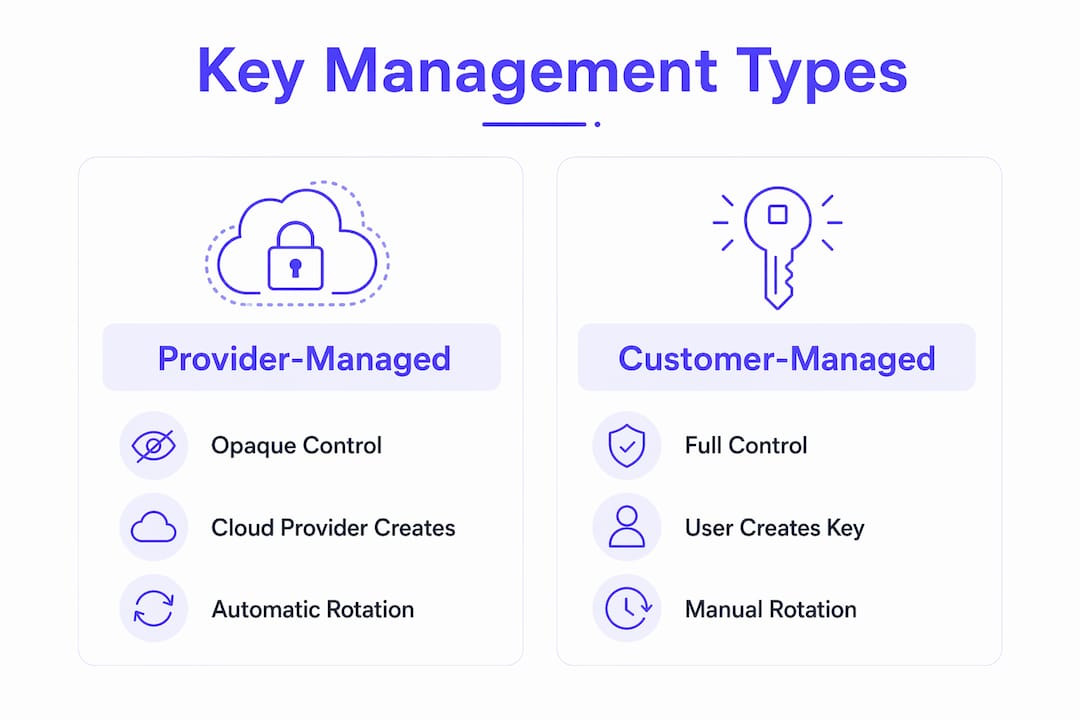
Customer-managed encryption keys (CMEK or CMK) are encryption keys you create, own, and manage inside a cloud KMS. The cloud provider uses your key to protect data at rest, but you retain full control over rotation schedules, access policies, and revocation. That separation is the point: administrators responsible for keys can be entirely distinct from those who manage the underlying data.
Provider-managed keys (sometimes called AWS-owned keys or Google default encryption) are simpler to operate, but they give you less direct control over key lifecycle, rotation, and key-operation audit evidence. With CMK, supported services record key operations in the relevant cloud audit logs, giving security teams a clearer cryptographic boundary when contracts or compliance programs require it.
Key ownership comparison:
| Dimension | Provider-managed keys | Customer-managed keys |
|---|---|---|
| Who creates the key | Cloud provider | You |
| Rotation control | Provider | You |
| Audit log visibility | Limited | Full (CloudTrail, Cloud Audit Logs, Azure Monitor) |
| Revocation capability | None | Controlled by key policy; propagation and caching can vary |
| Monthly cost | Included | Per-key fee + per-operation charges |
AWS KMS charges a monthly existence fee per customer-managed key plus usage fees for each cryptographic operation. Google Cloud KMS and Azure Key Vault follow similar per-key and per-operation pricing models.
How CMKs technically protect your data in practice
CMK protection works through envelope encryption. The service generates a short-lived data encryption key (DEK) to encrypt your actual data, then wraps that DEK with your CMK (the key encryption key, or KEK). Only the wrapped DEK is stored alongside the data; the CMK never touches the raw payload directly.
The critical dependency: When a service uses a CMK to wrap its DEK, the service’s agent must retain permission to use that key. Revoking the role or disabling the key can block access to protected resources, although exact propagation behavior depends on the provider, service, and any cache window.
The flow across major providers looks like this:
- Key creation/import: You create a key in AWS KMS, Google Cloud KMS, or Azure Key Vault, or import your own key material.
- Service agent assignment: You grant the service’s identity (an AWS IAM role, a Google Cloud service account, or an Azure managed identity) permission to use the key for encrypt/decrypt operations.
- Wrap/unwrap at storage time: On every write, the service calls the KMS to wrap a fresh DEK. On every read, it calls the KMS to unwrap the DEK before decrypting the data.
- Audit logging: Every KMS call is recorded in CloudTrail (AWS), Cloud Audit Logs (Google), or Azure Monitor.
Google Cloud’s Autokey feature automates key ring creation and service-agent grants, reducing manual provisioning steps while preserving full CMEK ownership and compliance properties.
Pro Tip: Enable KMS key usage alerts from day one. An unexpected spike in decrypt operations during an onboarding batch run is your earliest signal of a misconfigured pipeline or a runaway process.

How BYOK for AI differs from CMK for infrastructure
These two controls operate at entirely different layers, and conflating them causes implementation mistakes.
CMK (infrastructure layer): Controls encryption of data at rest. It wraps the DEK that protects files, database rows, and object storage. Relevant to your spreadsheet and image uploads sitting in cloud storage between processing steps.
BYOK for AI (application layer): Supplies your own API key to an AI model provider (OpenAI, Anthropic) so that model usage is billed to your account and visible in your provider console. It does not encrypt stored data.
- CMK responsibilities: Key rotation, IAM policy management, deletion safeguards, recovery planning, and audit log review.
- BYOK for AI responsibilities: Monitoring the provider console for usage spikes and key expiration, rotating API keys on your own schedule, and ensuring keys are not hardcoded in application code.
- Both simultaneously: A data-onboarding pipeline that uses AI for column mapping and PII detection should apply CMK to the storage layer and BYOK for AI to the model-call layer. Anthropic’s Claude platform supports CMEK via AWS KMS, Google Cloud KMS, or Azure Key Vault, with all encryption operations processed in US regions.
The practical onboarding use case: your pipeline ingests a messy spreadsheet, stores the raw file in encrypted object storage, calls an AI model to map columns through your provider key, and writes the clean schema-ready record back to storage. If the bucket or storage account uses CMK/CMEK, the storage layer remains under your key policy while the AI access layer remains a separate BYOK control.
When are CMKs worth the operational cost for onboarding workflows?
Enable CMK when at least one of these conditions applies: a regulatory framework, security policy, or customer contract specifically calls for customer-managed encryption keys; your audit program demands cryptographic proof of data isolation; or you handle high-sensitivity PII where customer-controlled revocation is a contractual requirement.
| Factor | CMK | Provider-managed keys |
|---|---|---|
| Compliance fit (HIPAA, PCI, FedRAMP) | Can support required controls | May be enough unless CMK is explicitly required |
| Audit trail for key operations | Full | Limited |
| Revocation speed | Customer-controlled; provider behavior varies | Not available |
| Operational load | High | Low |
| Monthly cost | Higher | Included |
| Risk of data loss from misconfiguration | Real | Low |
U.S. regulatory context:
- HIPAA: Covered entities and business associates must implement technical safeguards for ePHI. CMK can support auditability and access-management controls, but it does not by itself make a workflow HIPAA compliant.
- PCI DSS: Requirement 3 covers strong cryptography and key management for stored cardholder data. CMK and HSM-backed keys can help satisfy those controls when implemented with the right scope, policies, monitoring, and evidence.
- FedRAMP: Moderate and High baselines include cryptographic module requirements. Azure Key Vault Managed HSM can be part of a FedRAMP-aligned architecture, but the full authorization depends on the entire system boundary and assessment.
CMEK is primarily a compliance and control tool, not a universal security improvement. Decide based on contractual or regulatory need and your team’s capacity to operate keys safely.
Step-by-step checklist to enable CMK for a data-onboarding platform
Before creating a single key, validate that your compliance requirement actually mandates CMK and that your onboarding vendor supports external key material. Provisioning a key before confirming vendor support wastes effort and can create orphaned key policies.
- Define your key lifecycle policy. Decide rotation frequency, retention period, and who owns the key admin role. Document this in a runbook before touching any console.
- Choose your protection level. Software-protected keys (AWS KMS, Cloud KMS software) are lower cost. HSM-backed keys (Azure Key Vault Managed HSM, Cloud HSM) may be required for specific assurance or regulatory programs.
- Create or import the key. Use your chosen KMS. For Google Cloud, consider Autokey to automate key ring and service-agent setup.
- Set IAM and key policies. Grant only the service agent the Encrypter/Decrypter role. Apply least-privilege and Zero Trust principles; no human identity should have routine decrypt access.
- Enable soft-delete and purge protection. Azure guidance explicitly recommends both to prevent accidental permanent deletion. AWS KMS enforces a minimum 7-day deletion waiting period; use it.
- Configure your vendor or service to use the CMK. For Anthropic Claude, this is permanent per workspace — verify the principal identifier against published production identities before attaching.
- Run a dry-run with test data. Upload a representative sample of your spreadsheets and images through the onboarding pipeline in parallel with provider-managed keys. Measure latency delta and confirm all operations succeed before switching production traffic.
- Enable monitoring and alerts. Set CloudTrail, Cloud Audit Logs, or Azure Monitor alerts for key disable events, failed decrypt operations, and unusual usage volume.
- Document recovery and escrow rules. For imported key material, define how backups are protected. For non-exportable KMS keys, document break-glass access, deletion safeguards, and the exact data-loss consequence of revocation.
Pro Tip: Run your dry-run with the largest spreadsheet and highest-resolution image your pipeline will realistically process. KMS round-trips add latency on every read/write; you want to catch SLO violations in test, not production.
Costs and operational impact to budget for
Expect two categories of direct cost and one significant hidden cost. Direct costs include a monthly per-key existence fee and per-cryptographic-operation charges from your KMS provider. The hidden cost is engineering time: key lifecycle management, runbook maintenance, rotation testing, and incident response planning add ongoing operational load that provider-managed keys eliminate entirely.
- Per-key monthly fee: Charged by AWS KMS, Google Cloud KMS, and Azure Key Vault as a fixed monthly fee for key existence.
- Per-operation fees: Every encrypt, decrypt, wrap, and unwrap call may incur charges, which can accumulate with high throughput workloads.
- HSM premium: Managed HSM tiers (Azure Key Vault Managed HSM, Cloud HSM) typically have higher monthly costs than software-protected keys.
- Audit and monitoring costs: CloudTrail, Cloud Audit Logs, and Azure Monitor log storage and query costs scale with operation volume.
- Availability risk: Losing access to a CMK can put dependent services into an inaccessible state within minutes. Incident response for a key outage requires dedicated runbooks and on-call coverage.
Common pitfalls and how to prevent them
The top operational risks with CMK are irrecoverable data loss, service lockout from accidental key deletion or revocation, audit blind spots from misconfigured logging, and unexpected billing from high-volume decrypt operations.
- Accidental key deletion: Enable soft-delete and purge protection on day one. Cockroach Labs’ CMK documentation warns that misconfiguring or losing access to a CMK risks irreversible data loss because the cloud provider retains no copy.
- Service lockout: Test key revocation in a non-production environment before enabling in production. Know your provider’s revocation propagation delay (Anthropic’s cache TTL is up to one hour).
- Misaligned IAM: Audit key policies quarterly. Over-permissioned identities are the most common source of unintended access.
- Expired BYOK API keys: Monitor your AI provider console for expiration dates. A lapsed key silently breaks column-mapping and enrichment steps mid-pipeline.
- No recovery plan: Document who can recover key access, what happens if key material is lost, and which data becomes unrecoverable. Run a simulated key-loss drill at least annually.
Incident response priorities: (1) Recover key access using your documented break-glass process. (2) Revalidate access to affected data. (3) Notify stakeholders and document the timeline. Involve your security team, platform engineering, and vendor support simultaneously.
Pro Tip: Apply resource locks to your KMS key resources in Azure and equivalent protections in AWS and Google Cloud. A lock prevents even privileged operators from deleting a key without an explicit unlock step, adding a human-speed circuit breaker to an otherwise automated system.
How Transmutify supports customer-managed storage and BYOK
Transmutify supports bring-your-own AI keys for model calls and customer-managed S3-compatible storage for transformation files. If your organization requires CMK/CMEK, configure that encryption policy on your own bucket or cloud storage account, then connect that storage to Transmutify.
- BYOK for AI model calls: Supply your own OpenAI, Anthropic, Gemini, xAI, or OpenRouter API key for supported AI-assisted mapping and schema steps. Usage follows your provider account, and you control rotation.
- PII-safe file mapping: Transmutify’s mapping layer is designed to avoid exposing raw PII during structured schema transformation, complementing your customer-managed storage layer.
- Customer-managed storage: Store transformation files in your own S3-compatible bucket. Transmutify connects to that bucket; your cloud account owns the bucket policy, lifecycle policy, and any CMK/CMEK configuration.
- Dry-run/test workflow: Run a full onboarding pass against a sample dataset before committing to production. Validate storage access, provider keys, upload events, and pipeline throughput in the same step.
- Human review and hosted approval UI: Reviewers approve mapped records through a hosted interface without needing direct access to the underlying encrypted storage.
- Webhook integration: Trigger downstream systems only after human approval, keeping your key-protected data within defined boundaries until records are validated.
To get started: sign up at Transmutify, run a dry-run with a representative spreadsheet or image, verify your bucket and key policies are in place, and confirm BYOK configuration before processing live client data.
Key Takeaways
Customer-managed keys give your organization exclusive lifecycle control over encryption for data at rest, but they shift full operational responsibility to your team — enable them when compliance or contracts require it, not by default.
| Point | Details |
|---|---|
| Use CMK for compliance triggers | Enable CMK when your compliance program, security policy, or customer contract explicitly requires customer-managed encryption keys for the storage layer. |
| BYOK for AI is a separate control | BYOK for AI manages API billing and model access; it does not encrypt stored data. |
| Deletion safeguards are mandatory | Use provider-specific safeguards such as soft-delete, purge protection, waiting periods, resource locks, and break-glass access before attaching any CMK to production data. |
| Budget for per-key and per-operation fees | Direct KMS costs include monthly per-key fees plus charges for every encrypt and decrypt operation. |
| Dry-run before production | Test with representative spreadsheets and images to catch KMS latency issues before they affect SLOs. |
The operational reality most teams underestimate
The gap between enabling CMK and operating it safely is wider than most implementation guides suggest. Teams often treat key provisioning as a one-time configuration task, then discover months later that rotation policies were never tested, recovery procedures were never validated, and the on-call runbook assumes the key is always available. The dry-run recommendation in every checklist exists precisely because a failed decrypt in a high-throughput onboarding pipeline at 2 AM is a different problem than a failed decrypt in a test environment at 10 AM with your KMS vendor on the phone.
The BYOK-for-AI layer adds a second operational surface that most infrastructure teams are not watching. An expired AI API key breaks column mapping silently — the pipeline may continue to run, producing records with unmapped or incorrectly mapped fields, and the error surfaces only during a downstream data quality review. Monitoring the model-provider console for key expiration is not optional; it belongs in the same runbook as your KMS rotation schedule.
The honest recommendation: if your compliance program does not require CMK today, start with provider-managed keys and build the operational muscle (runbooks, rotation drills, and recovery exercises) in a lower-stakes environment first. When the regulatory requirement arrives, you will be ready to enable CMK without treating it as an emergency.
Useful sources for implementation and compliance verification
- AWS KMS concepts and customer-managed keys — official AWS documentation covering key types, lifecycle, rotation, and CloudTrail logging.
- Google Cloud CMEK overview and Autokey — covers service-agent model, Autokey provisioning, and compliance properties.
- Google Cloud Storage CMEK — object-level and bucket-level CMEK configuration for storage workloads.
- Azure Storage customer-managed keys overview — covers Key Vault, Managed HSM (FIPS 140-3 Level 3), and Azure Cloud HSM tiers.
- Azure Key Vault key management fundamentals — Zero Trust alignment, protection tiers, and IAM guidance.
- Azure Database for MySQL CMK and operational safeguards — soft-delete, purge protection, resource locks, and inaccessible-state recovery.
- Anthropic Claude CMEK configuration — AWS KMS, Google Cloud KMS, and Azure Key Vault integration for Claude workspace encryption (US regions).
- CockroachCloud CMK guidance — practitioner warnings on irrecoverable data loss and recovery planning.
- SingleStore blog: CMEK for cloud databases — operational separation between infrastructure CMK and application-layer BYOK.
- Cloud Security Alliance: multi-cloud key management — framework-level guidance on when CMK adds compliance value versus operational cost.